Quick answer
Use the Dock for favorites, Spotlight for names, and Launchpad for everything you browse.
If you have dozens of apps on macOS Tahoe 26, the fastest workflow is to stop forcing one launcher to do every job. The Dock should stay small. Spotlight should stay for exact search. Launchpad should handle the fullscreen overview that lets you scan icons, remember pages, and open less-frequent apps without thinking about exact names.
Dock overflow
When too many apps live in the Dock, the visual shortcut becomes cluttered and slower to use.
Search is not enough
Spotlight stays fast, but only when you already know what to type and do not need a visual overview.
Lost page memory
Old Launchpad users often remember app location by page, row, and icon shape rather than by exact app name.
Why app overload feels worse after Tahoe
Before macOS Tahoe, many people handled larger app libraries with a simple habit: open Launchpad, scan a familiar page, click the icon, move on. After that fullscreen layer changed, users with many utilities, design tools, developer apps, or secondary work apps often feel slower. That is why queries about missing Launchpad often hide a second issue: there are simply too many apps to fit comfortably into the Dock or into memory as text search alone.
The old Launchpad experience was really app organization
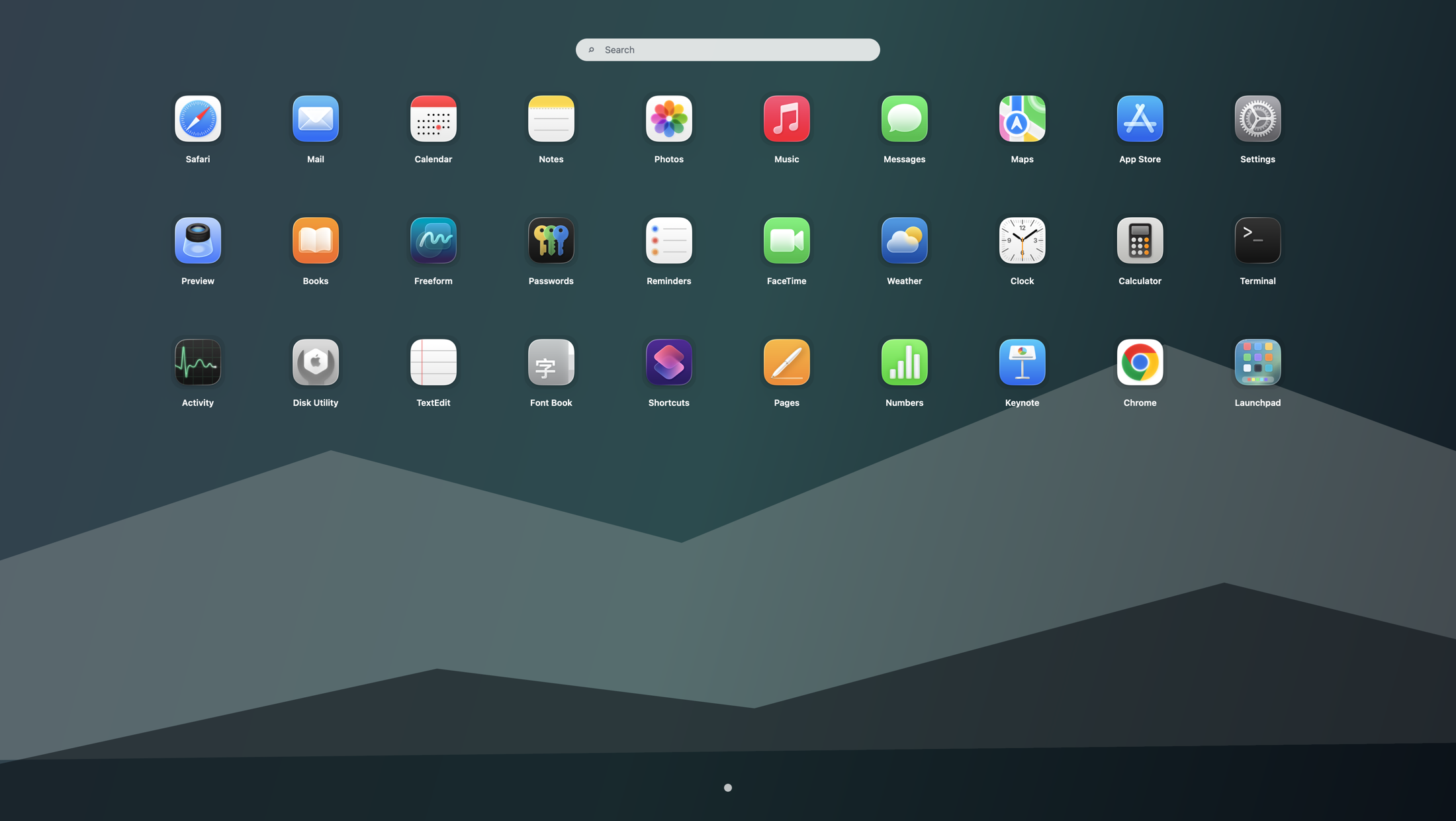
The classic fullscreen grid did more than launch apps. It gave your Mac a visual map. You could group apps by page, leave some tools for occasional use, and still find them quickly. If you are trying to reorganize a crowded Mac after Tahoe, the most effective move is often to bring back that map rather than constantly shuffling Dock icons or digging through Applications.
A better setup for 30, 50, or 100+ apps
- Keep only true daily apps in the Dock.
- Use Spotlight for exact-name launches, files, and settings.
- Use Launchpad as the visual layer for secondary and occasional apps.
- Set a hotkey or hot corner so the fullscreen grid is one gesture away.
- Adjust icon density and page layout until the screen matches your memory.
Why this beats a bigger Dock or more folders
Adding more Dock folders can help a little, but it does not recreate the old fullscreen browsing flow. Finder Applications is accurate but slower. Spotlight is excellent when you know exactly what you want. Launchpad fills the missing middle ground: open one clean fullscreen surface, scan, move between pages, and launch. If you want a broader comparison, start with our alternatives guide. If you want the general launch method stack, read the workflow page.
Who should install a dedicated fullscreen launcher
This is most useful for people with crowded app libraries, visual memory for icon placement, shared Macs with many installed apps, or a strong habit from the old Launchpad era. If you mostly type exact names, you may be fine with Spotlight alone. If you browse by recognition instead of recall, restoring the grid will usually feel faster.
Use Tahoe's newer tools without giving up the old habit
You do not need to fight the rest of macOS. Let Spotlight stay modern and text-first. Let Finder stay for management. Let the Dock stay selective. Then add Launchpad back as the visual overview layer that many users still want. Chinese-speaking users can continue with the localized companion page: macOS Tahoe 应用太多怎么找.
Search terms this guide answers
FAQ
How do I find apps faster on macOS Tahoe when the Dock is crowded?
Trim the Dock back to daily apps, keep Spotlight for exact-name search, and use Launchpad for fullscreen browsing. That prevents one launcher from becoming overloaded.
Is Spotlight enough if I have too many apps on my Mac?
It is enough only if you mostly remember app names. If you browse by icon memory, page position, or visual grouping, a fullscreen launcher is more natural.
What is the best way to recreate the old Launchpad experience for lots of apps?
Install Launchpad, open it from a hotkey or hot corner, and treat it as your visual app map while keeping Spotlight and the Dock for their own strengths.